

Smoother skin, brighter smile, a fresh look — and still clearly you


⇆
Smoother skin, brighter smile, a fresh look — and still clearly you
Apple PayG PayVISA
Face close up, in good light.
Smooth skin, no blemishes or under-eye bags, whiter teeth, a sharper jawline — or an example face.
Only what you picked changes; you still look like you.
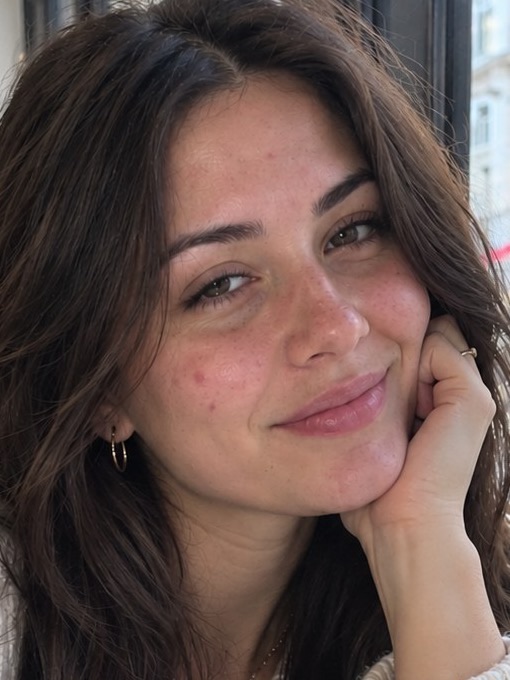 before
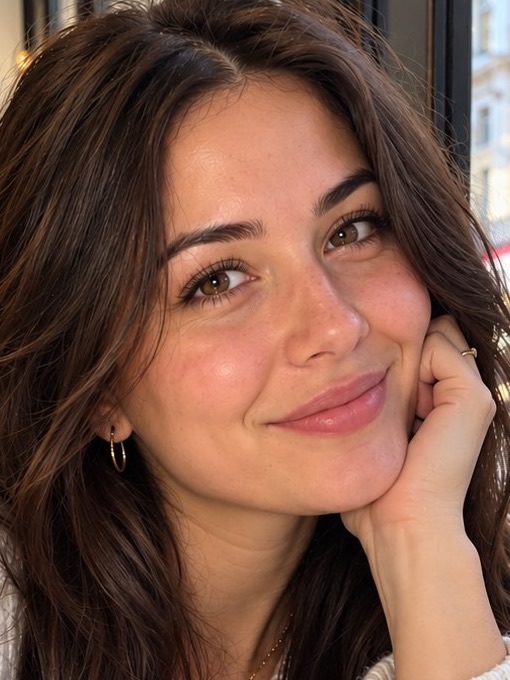 after
Upload a photo and tick what to fix — skin, blemishes, under-eye bags, teeth, jawline. The AI retouches only that and keeps the photo natural.
No. The goal is a natural photo: skin texture and your features stay, nothing gets a plastic look.
Yes — pick “Smooth skin” and “No blemishes”. Freckles and moles stay unless you ask otherwise.
Yes, pick “Whiter teeth” for a natural, not glowing, white.
Your first try-on is free. From S$1.29 per photo, no subscription, and try-ons never expire. There is no watermark.
No app or sign-up — it works in the browser on your phone or computer.
