How to change clothes in a photo
Updated: 06.11.2026
In short: To change clothes in a photo, you can edit the outfit by hand in a photo editor, describe a new outfit to a general AI image tool, or use a virtual try-on app that puts a real product onto your picture. For shopping, a try-on app is the most useful, because it shows the actual item you want to buy. With AnyTry, you upload your own photo, add a screenshot or link of the clothes, and see the outfit on you.
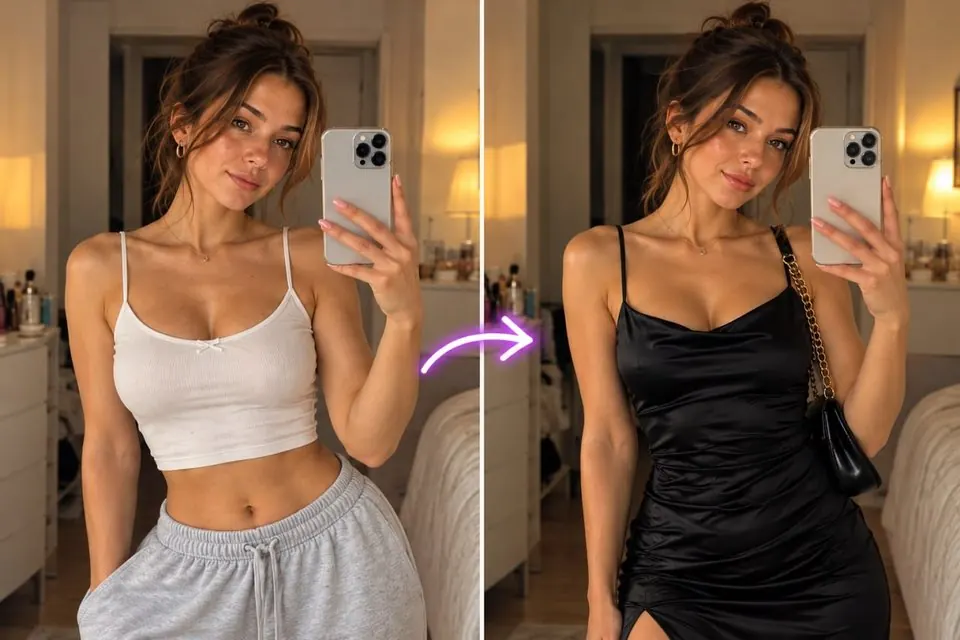
What are the ways to change clothes in a photo?
There are three main ways: manual editing, AI image prompts, and dedicated try-on apps.
| Method | Best for | Why |
|---|---|---|
| Photo editor (manual) | Small fixes like color changes | Full control, but slow and needs skill |
| General AI image tool + prompt | Creative ideas and mood images | Fast, but the clothes are invented, not a real product |
| Virtual try-on app (AnyTry) | Seeing a real item before you buy | Uses the exact product from a store link or screenshot |
How do you change clothes in a photo editor?
In a photo editor, you select the garment, then recolor it, add a pattern, or paste in a new piece and blend it.
- Use layers and masks so you can undo changes.
- Match the light direction and shadows, or the edit looks flat.
- Folds and drape are the hardest part to fake.
Can AI change clothes in a photo with a prompt?
Yes, many general AI image tools can redraw an outfit from a text prompt like "change the jacket to a camel wool coat". The result is quick, but the AI makes up the garment, so it won't match a product you can actually order.
Want to see a real product instead? Try a store outfit on your photo
Photo editor vs AI try-on: which is better for shopping?
For shopping, an AI try-on app is better because it starts from the item you plan to buy. A photo editor is better for precise, small edits where you control every pixel.
AnyTry (anytry.app) is an AI virtual fitting room: upload your own photo and try on clothes, swimwear or lingerie from any store link before you buy.
How do you get a realistic result?
A good source photo matters more than the tool. Use these tips:
- Stand straight, facing the camera, full length or waist up.
- Use even daylight and a plain background.
- Wear fitted, simple clothes so the new outfit sits well.
- Pick product images with the garment clearly visible.
Read more in our guide to trying on clothes without buying.
What are the rules for changing clothes in photos?
Only use photos of yourself, and only adults. AnyTry is made for trying on clothes, swimwear and lingerie over your own photo; it never removes clothes from anyone's picture.
See it on you before you buy
Product photos show a model, not you. Take one clear photo, add screenshots of two or three outfits from any shop, and compare how each one looks on your body before you order. See the outfit on your photo
FAQ
how do I change clothes in a photo on my phone? Changing clothes in a photo on a phone works best with a try-on app or an AI image tool. Upload a clear, well-lit photo of yourself and add the outfit you want to see.
can AI put a specific dress from a store on my photo?
A virtual try-on app like AnyTry puts a specific dress from a store link or screenshot onto your photo. A general prompt-based AI tool usually invents a similar dress instead.
is it safe to upload my photo to a try-on app?
Uploading a photo to a try-on app is a privacy choice, so read the app's privacy policy first. Our guide on whether AI virtual try-on is safe covers what to check.
does changing clothes in a photo show my real size?
No, changing clothes in a photo shows the look, not the size. Use the store's size chart and your own measurements to choose a size.